Slick Carousel
Di bawah adalah cara-cara bagaimana membuat slideshow mengunakan Slick Carousel.
Pertama
- Muat turun module Slick Carousel
- Muat turun Slick Carousel library dan masukan ke librarias seperti di bawah
- libraries/slick
- libraries/easing (pilihan)
- Muat turun Blazy (diperlukan oleh Slick Carousel)
- Muat turun Blazy library dan masukan ke librarias seperti di bawah
- libraries/blazy
- Muat turun Slick Views - untuk memasukan format di dalam View
Kedua
- Buat content type baru dengan nama Slideshow (sebagai contoh)
- Masukan field image & boleh namakan sebagai Slide (ayau apa-apa mengikut kesesuaian). Jumlah image adalah Unlimited.
- Buat setting kepada Slide (supaya menepati keperluan anda), update dan save. Contoh setting seperti di bawah:
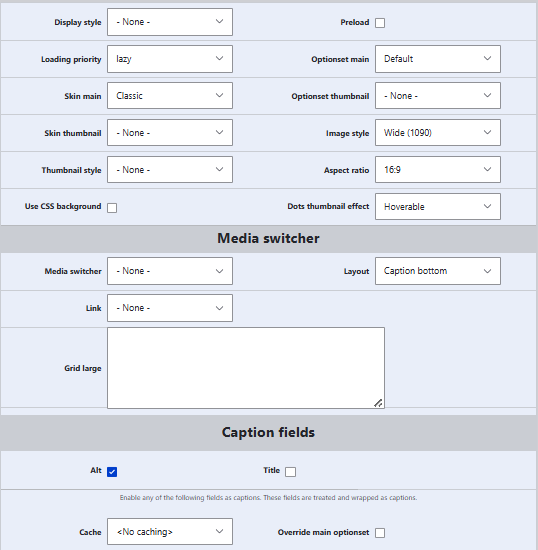
Ketiga
- Creata content baru dengan Slideshow
- Masukan Slide lebih dari satu..
- Masukan Alternative text
- Save
Siap..
Nota: Bagaimana untuk integrasi dengan Views
- Pada yang biasa, setting Click Carousel pada Views - tidak ada caption untuk Alt
- Oleh itu kita kena buat Rewrite..caranya
- Click Field
- Add image
- Lepas itu buat rewrite: {{ field_image_1__alt }}
- Click Format > Slick Couresel > Setting
- Content: Image
- Perhatian !: Di situ ada 2 Content: Image
- Yang kedua itu kita pilih (yang kita sudah buat rewrite!
Rujukan: Bagaimana gunakan dengan View: https://www.zyxware.com/articles/5812/how-to-create-slider-using-slick-view-in-drupal
Nota:
- Slick Carousel tidak compatable dengan Drupal 11
- Slick (module & the library) mengunakan jQuery.type(), yang mana ianya deprecated dan tidak lagi ada di jQuery 4 (yang digunakan pada Drupal 11)
- Artikel ini boleh sedikit membantu bagaimana untuk gunakan Slick Carousel pada drupal 11. https://www.drupal.org/project/slick/issues/3467129#:~:text=Update%3A%20I%20have%20resolved%20the%20issue%20with%20Slick%20Carousel%20in%20Drupal%2011.
Di bawah adalah apa yang dia lakukan
I have resolved the issue with Slick Carousel in Drupal 11.
The problem was due to the use of $.type() in the slick.js file, which is no longer supported in jQuery 4 used by Drupal 11. To fix this, I replaced all instances of $.type() with appropriate native JavaScript methods.
Here are the specific changes I made in /libraries/slick-carousel/slick/slick.js:
1) Replace $.type() when checking for an array:
Before:
if ( $.type(responsiveSettings) === 'array' responsiveSettings.length ) {
After:
if ( Array.isArray(responsiveSettings) responsiveSettings.length ) {
2) Replace $.type() when checking for an object:
Before:
if( $.type( arguments[0] ) === 'object' ) {
After:
if ( typeof arguments[0] === 'object' arguments[0] !== null !Array.isArray(arguments[0]) ) {
3) Replace $.type() when checking for a string:
Before:
else if ( $.type( arguments[0] ) === 'string' ) {
After:
else if ( typeof arguments[0] === 'string' ) {
4) Replace $.type() when checking if an argument is an array:
Before:
if ( arguments[0] === 'responsive' $.type( arguments[1] ) === 'array' ) {
After:
if ( arguments[0] === 'responsive' Array.isArray( arguments[1] ) ) {
5) Replace $.type() when ensuring a property is not an array:
Before:
if( $.type( _.options.responsive ) !== 'array' ) {
After:
if ( !Array.isArray( _.options.responsive ) ) {
After making these changes, I minified the updated slick.js file using UglifyJS to create a new slick.min.js. I replaced the old slick.min.js with this new one.
Once these steps were completed, the slider started working correctly again!
Category
client = ca-pub-2898279488603899
slot = 9058461004
format = auto